
Quick answer
Google Keyword Planner is free as of November 20, 2026, though Google wants a Google Ads account with billing details before it shows keyword ideas. No ad needs to run: our team pulled US ranges such as 10K-100K for "google keyword planner" with no campaign live. Set the location to United States first, then open Discover new keywords.
Google Keyword Planner is a free research tool inside Google Ads that suggests keywords and estimates their monthly searches. It can show which wording US readers type more, even if you've never bought an ad. It's built for advertisers, so bloggers run into billing screens and bid columns.
Our team pulled US numbers for 20 of our posts on November 20, 2026, with no campaign running. The first screen wasn't ready for US research. The location box opened on India, and every volume came back as a range, such as 1K-10K for keyword planner.
Key takeaways
- Enter billing details in Google Ads, or keyword ideas stay locked.
- Switch the location to United States before you trust any volume.
- Our pull used six buckets, each ten times the one below.
- Competition counts advertisers, so it says nothing about ranking difficulty.
- In 9 of our 20 posts, a related term had a higher range.
How do you get into Google Keyword Planner without running ads?
Google's own pages don't agree on access. The FAQ on the Google Keyword Planner page says "Anyone with a Google Ads account can access the Keyword Planner tool after they create a campaign." It adds that "No separate account creation is necessary," because the tool sits in the Tools menu of Google Ads.
Google Ads Help sets the bar at billing instead. Its Use Keyword Planner page says you must finish account setup with billing information before basic features like "Get ideas for new keywords" open. The Google Ads sign-up guide goes further. It offers "the option to create an account without a campaign," and its tip says you can skip all recommendations to create one. Our team's account had no campaign on November 20, 2026, and Keyword Planner still returned volume ranges. The product page's campaign line didn't hold for us. We'd plan around the billing line.
Google's US Keyword Planner product page calls the tool free, but entering a card has side effects. The sign-up guide warns of "a temporary authorization on your card account that will typically be removed within a week." Google may also ask for a small prepayment, which it calls "fully refundable if you request a refund or close your account," and says it goes toward future advertising costs. Agencies should know one more quirk: Google says numbers can differ inside one child account depending on whether you log in directly or through a manager account.
New accounts can also open in Smart Mode. The product page FAQ says to switch to Expert Mode, then open Tools, Planning and Keyword Planner.
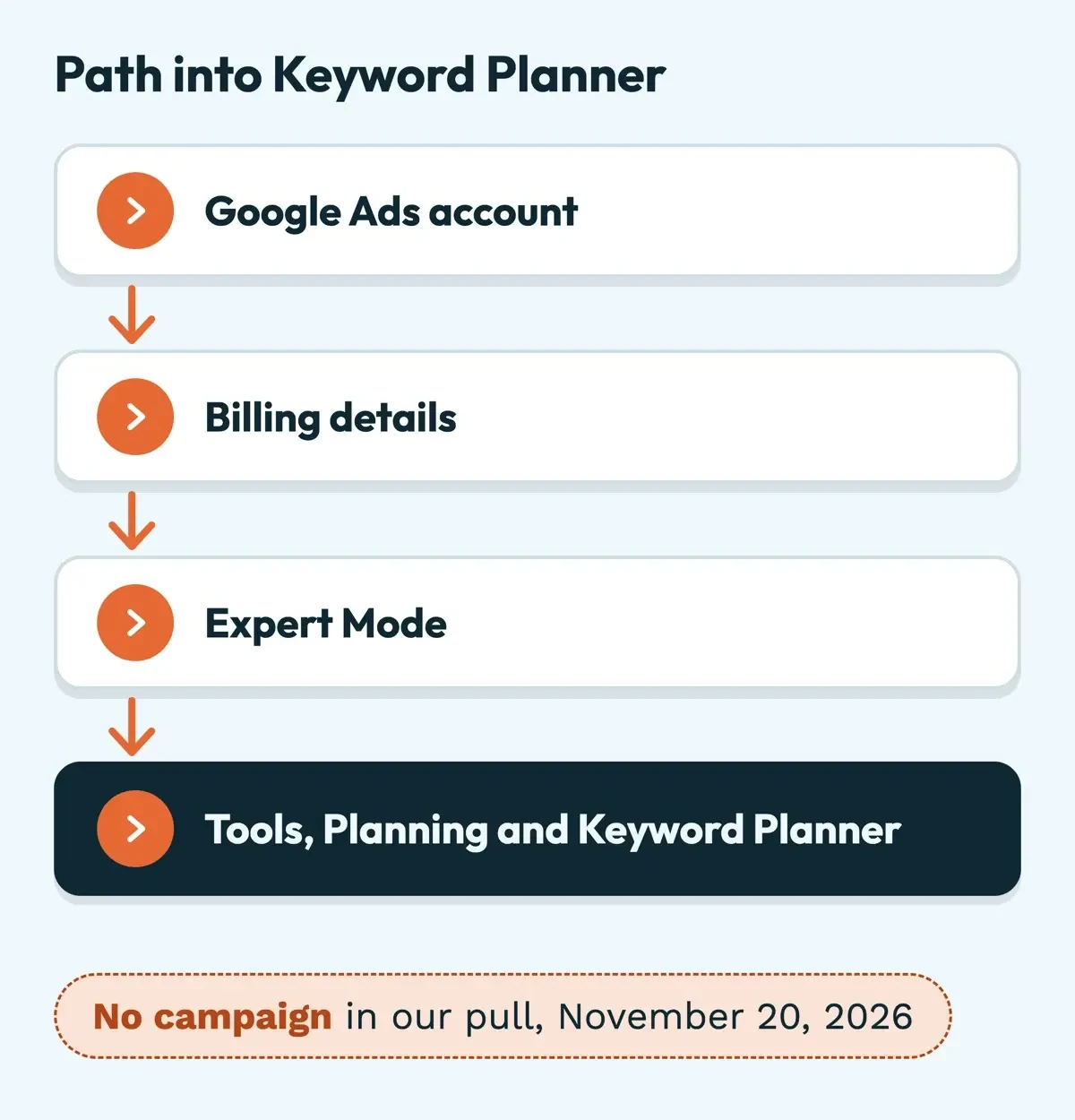 Diagram by DigitalTreed, from Google Ads Help and the Keyword Planner product page, read November 20, 2026.
Discover new keywords or get search volume first?
Inside, you'll see two starting points. Discover new keywords turns a few words or a website into related ideas, while Get search volume and forecasts returns numbers for a list you already have. Discover new keywords has two modes. Start with keywords takes phrases separated by a comma and a space. Start with a website takes any URL, and Google says it "will look for keywords related to the content on that site." Add your own domain next to your keywords and Google tries to drop unrelated ideas, and its tip says a keyword plus a URL returns more than a URL alone.
For seeds, Google's best practices for finding new keywords ask for terms neither too broad nor too narrow, so hiking boots over what are the best hiking boots. Wedding venue likewise beats the single word wedding. They also warn against starting with an adjective, so for a cooking blog a seed like sheet pan dinners beats easy cheap sheet pan dinners for two.
Get search volume and forecasts suits the shortlist you build later: paste terms, or upload a CSV file with one column headed "Keyword." Each keyword can't run past 80 characters or 10 words, per the Use Keyword Planner page. Question phrases near that limit are better checked as their shorter core, then matched to a long-tail keyword in your headings.
The second option also opens a Forecasts page, and it's built for ad budgets rather than blog posts. Google says the forecast "shows you how many conversions, clicks, or impressions you're likely to get for your keywords based on your spend." It also says forecasts are refreshed daily from the last 7-10 days, adjusted for seasonality. An example forecast of 40 clicks a day is what an ad might get at a given bid, not what a ranking post would earn. We'd ignore the Forecasts tab for SEO and stay on the historical columns.
Set the location to United States before you read a number
The location box, according to Google's Refine your new keywords page, takes countries, territories, regions and cities. Its Nearby button suggests places close to the one you typed, which helps a local blog compare a city with its suburbs. Remove every location and targeting becomes "All locations." Language is a separate box with its own list. Ours opened on India, the account's default. The pull only made sense after our team switched it to United States and English. Google's pages don't say the default follows your account country, so you'll want to check the Targeting panel above the graph every session.
Network has two choices. The Google option covers Google Search only, while Google and search partners adds Maps and partner sites that show Google ads. For SEO, we'd pick Google alone, since that's where organic rankings happen.
Our pull covered November 2025 to October 2026, a 12-month window. Google's own example of why the date range matters is a flower delivery business whose keywords peak in February, the month of Valentine's Day. If your post is seasonal, narrow the range to the month that matters before you compare terms. The same Refine page breaks average monthly searches down by platform: computers, mobile devices with full browsers, and tablets. That's handy if most of your readers arrive on phones. Want ideas drawn from your whole website rather than one page? Google says to add and verify the site first, and those ideas may need a month to appear.
Why search volume shows up as a range
Average monthly searches is the column most bloggers open first. Google's Keyword Planner forecasts page says it counts a keyword and its close variants for the months, location and network you picked. It adds: "By default, the number of searches for the term (regardless of language) is averaged over a 12-month period." Volumes cover exact matches only, and they aren't precise: "Your search volume statistics are rounded."
Our pull came back as ranges rather than counts, running from 0-10 for scope of blogging up to 100K-1M for temp mail.
| Search term (our pull, US, English) | Avg. monthly searches | Note |
|---|---|---|
| google keyword planner | 10K-100K | Title phrase of this post |
| keyword planner | 1K-10K | Shorter form of the same name |
| google ads keyword planner | 1K-10K | Names the Google Ads home |
| google keyword tool | 1K-10K | Informal name |
| what is drupal | 1K-10K | Above "drupal tutorial" at 100-1K |
| turn off facebook notifications | 1K-10K | Above "facebook quiet mode" at 10-100 |
| temp mail | 100K-1M | Highest range in our pull |
| scope of blogging | 0-10 | Lowest range shown |
Google's Keyword Planner help pages don't explain, as of November 20, 2026, when it shows a range instead of an exact figure. The forecasts page only says volumes are rounded, so we don't claim ad spend changes it. The table does show how coarse each range is: a 1K-10K term could get 1,000 searches or 9,000, so two terms in one range can't be ranked. Above 0-10, every range we pulled had that tenfold spread.
Across ranges, the order is clear. "google keyword planner" sits a full range above "keyword planner," so this post's title uses the longer phrase.
The gap was wider for facebook quiet mode at 10-100 against turn off facebook notifications at 1K-10K, which is 100 times apart at the low ends (1,000 / 10).
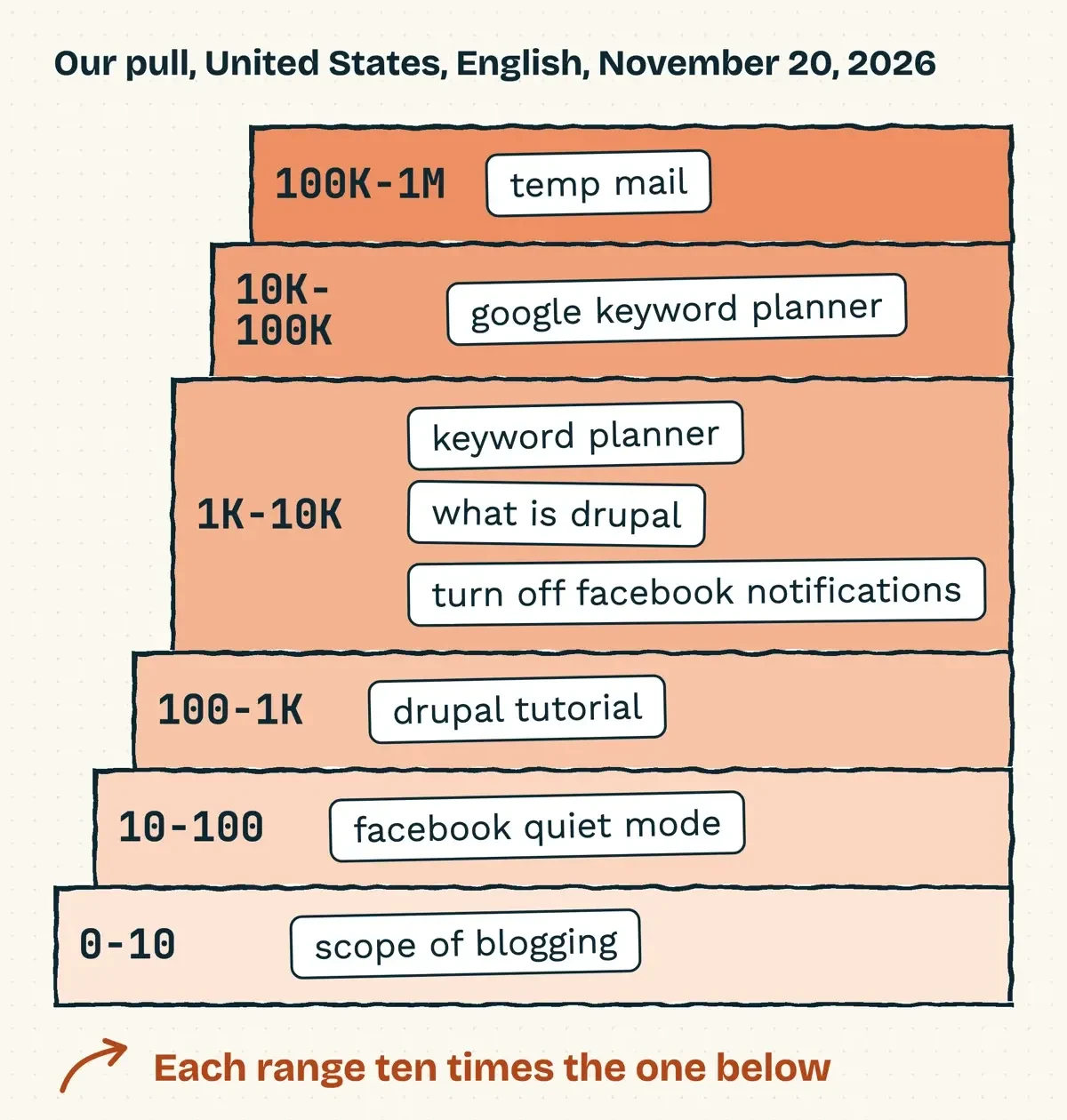 Drawn by us from our team's Keyword Planner pull, United States, English, November 20, 2026.
What we tested
Our script, range_check.py, read our team's two local Keyword Planner files on November 20, 2026. It found 20 posts and 106 range values, and every one of them matched one of six fixed buckets, each ten times the one below. In 9 of the 20 posts, a related term sat in a higher range than the title phrase. This post's 10K-100K title phrase wasn't one of them. The report it wrote opened on 127.0.0.1 with a 200 response.
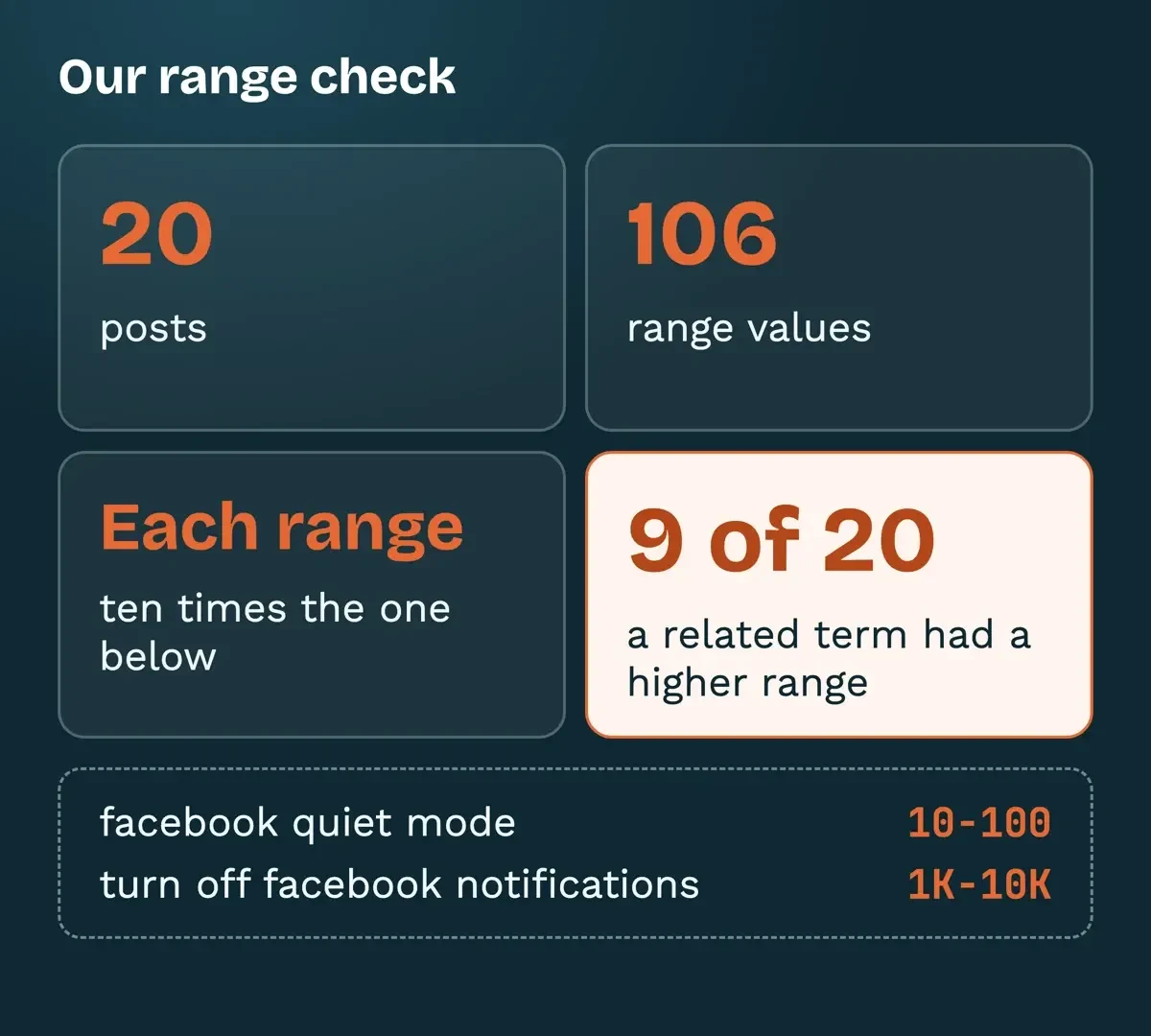 Drawn by us from our local range check of our team's Keyword Planner pull, November 20, 2026.
Competition and top of page bid describe ads, not rankings
Next to the volume column sit two columns that look like SEO difficulty but measure advertisers. The forecasts page defines Competition by how many advertisers showed on a keyword compared with all keywords across Google, graded low, medium or high. The bid columns are ad prices. The low range is "an approximation of the 20th percentile" of what advertisers paid for a top of page bid, and the high range approximates the 80th.
Bid ranges use the last 30 days of bid information, and Google says they may be missing for keywords with limited bid history. The Google Ads API reports the same signal as a competition index from 0 to 100. A comment in Google's historical metrics code samples says that index is "determined by the number of ad slots filled divided by the total number of slots" available. Only one column speaks to your own site. Organic impression share is the percentage of times a listing from your website showed up in web searches for that keyword.
We read a high bid as a hint that the click is worth money to someone, usually a buyer, and it doesn't show how hard the page is to rank. For ranking difficulty, our keyword research tools comparison explains why paid tools give four different scores for one term. For a post that's already live, start with your own queries instead. The Search Console Performance report, Google says, lets you "Learn which queries are bringing traffic to your site." Our guide to blog performance in GA4 and Search Console shows how to read it post by post.
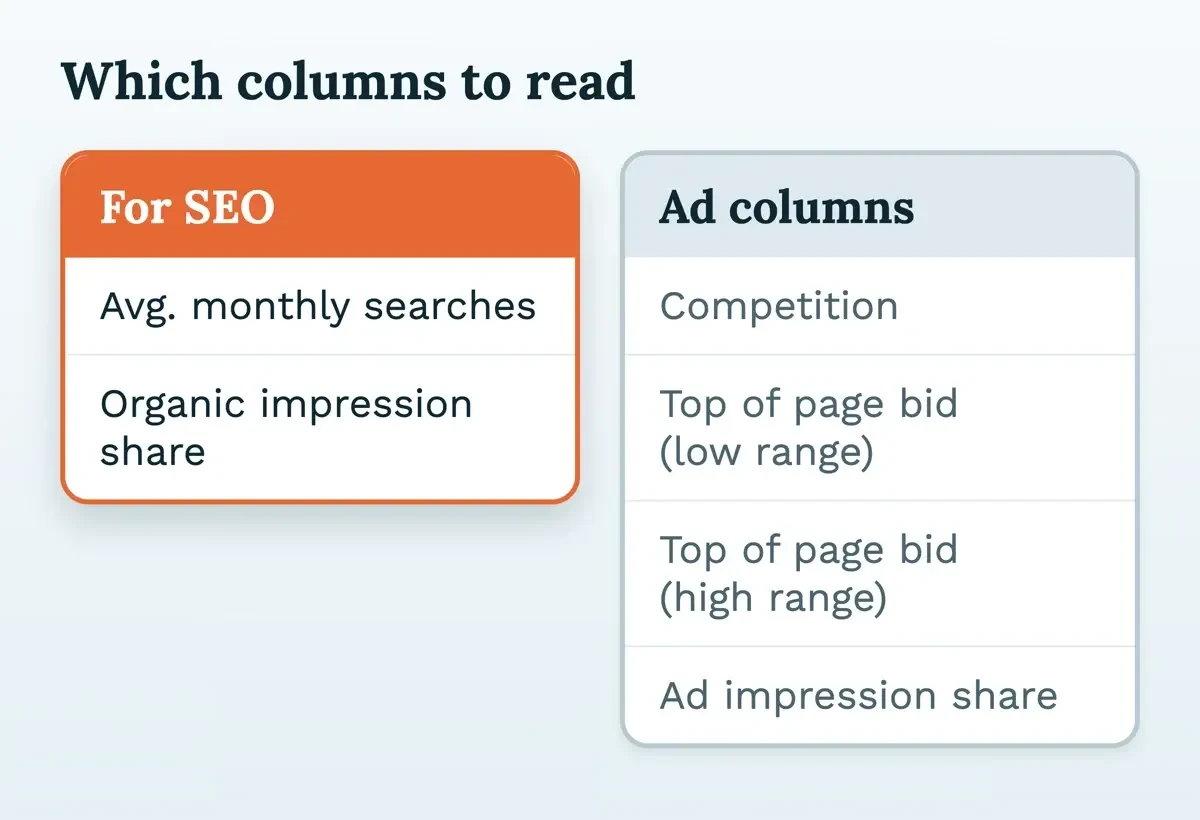 Diagram by DigitalTreed, from the Google Ads Help forecasts page, read November 20, 2026.
Refine keywords, then save or download the list
To cut a long idea list, the Refine keywords panel groups ideas by theme, brand or category.
Every category starts checked. In Google's running shoes example, uncheck every color but red, and only red running shoes ideas stay. Filters cut further, using these options from the Refine page:
- Keyword text
- Average monthly searches
- Top of page bid (low range) and (high range)
- Competition
- Organic impression share and ad impression share
- Exclude keywords already in your account
For blog research we'd keep two of them, keyword text and average monthly searches, then group what's left by the reader's goal, as in our search intent mapping guide. Advertisers also trim with negative keywords, which Google describes as excluding search terms, like an optometrist excluding wine glasses.
Saving runs through Saved keywords. Tick the boxes, pick a match type and add them to a new or existing plan.
The Use Keyword Planner page describes a download button on the Forecasts page, plus a Share button that gives others access to the plan. Organize keywords into ad groups works in English only, and Google says you can download that work for review. In WordPress, our Yoast focus keyphrase guide shows where the chosen phrase goes next.
Checked against Google's pages on November 20, 2026
We read these Google pages as text on November 20, 2026, without a Google Ads login, and checked them against our team's pull.
- Confirmed: Google calls Keyword Planner free on both its India and US product pages.
- Confirmed: Google Ads Help says billing details must be entered before keyword ideas open.
- Pages disagree: the product page FAQ says to create a campaign, but the sign-up guide allows none.
- Confirmed: average monthly searches is a 12-month average by default, and Google rounds it.
- Not published: no Google page we read says why some accounts see ranges instead of counts.
- Not published: our team saw India as the default location, and Google doesn't say why.
- Not confirmed: Google describes a download on the Forecasts page, not on Keyword ideas.
Free volume data outside Google is compared in our free keyword research tools roundup, and SEO tools by job in our SEO analysis tools guide. Google's helpful content guidance warns against "search engine-first content made primarily to gain search engine rankings." We'd use Keyword Planner to pick wording a reader already uses, then write the post for that reader.
Frequently asked
Can I check hundreds of keywords at once?
Yes. Google's historical metrics guide allows up to 10,000 keywords per Google Ads API request.
Why do health or finance keywords show no results?
Google's Use Keyword Planner FAQ says its privacy and personalized advertising policies "often prevent results for keywords in sensitive categories like health or finance."
Should I put my keywords in a keywords meta tag?
No. The SEO Starter Guide from Google says "Google Search doesn't use the keywords meta tag." It also counts keyword stuffing against its spam policies.
Is Google Trends a replacement for the Google keyword tool?
Not for volume. The Google Trends data FAQ says results are scaled from 0 to 100, and low-volume terms appear as "0."
How we made this guide: We read Google Ads Help, Keyword Planner product pages and Search Central pages as text, then ran a local script over our team's pull. Facts checked by the DigitalTreed team on November 20, 2026.
First published July 29, 2020 as an overview of Google Keyword Planner. Rewritten November 20, 2026 as a how-to for free SEO use, with our own US pull.
Sources
- Google: Keyword Planner product page (India)
- Google: Keyword Planner product page (United States)
- Google Ads Help: Use Keyword Planner
- Google Ads Help: Refine your new keywords in Keyword Planner
- Google Ads Help: About Keyword Planner forecasts
- Google Ads Help: Best practices for finding new keywords
- Google Ads Help: Create a Google Ads account
- Google Ads Help: About negative keywords
- Google Ads API: Generate historical metrics
- Search Console Help: Performance report
- Trends Help: FAQ about Google Trends data
- Google Search Central: SEO Starter Guide
- Google Search Central: Creating helpful, reliable, people-first content

Comments
No comments yet. Start the conversation below.